Website Development, AI & SEO Agency
London: 116 Cavell Street, E1 2JA · Dhaka: Rd #24, H #10, Rupnagar, Mirpur-1216

WordPress · Platform guide
Is WordPress Still the Right Choice for a Business Website?
By Shaiful Mozumder · Published 18 November 2026
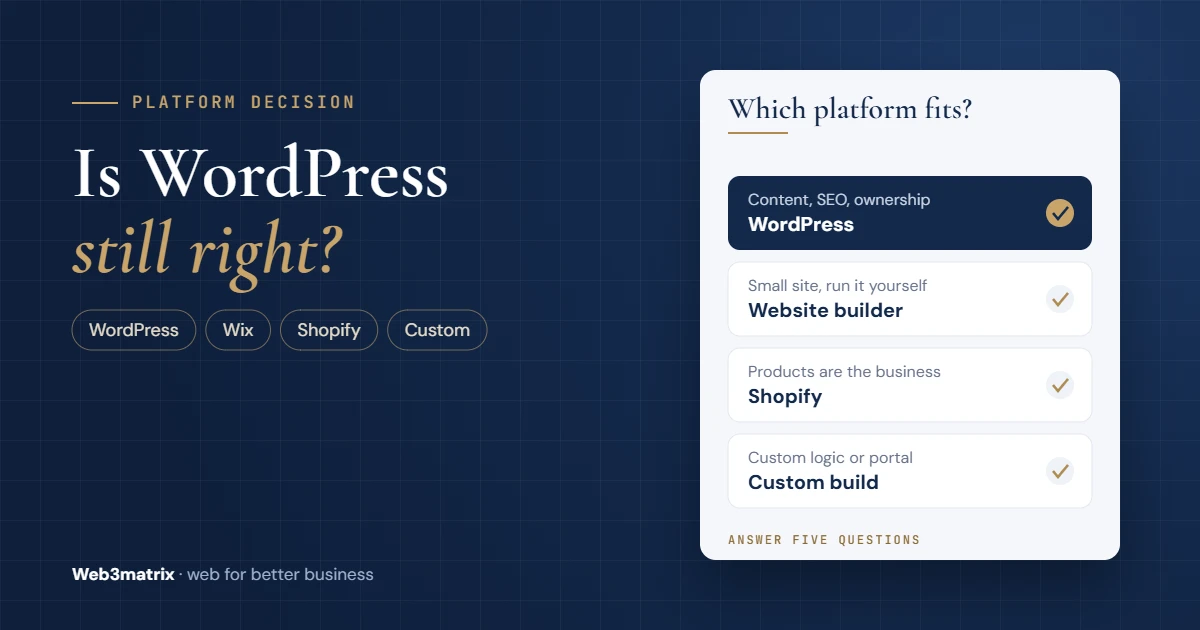
Ask three people which platform your business website should use and you will probably get three answers. A developer recommends WordPress, a friend swears by Wix, and the shop down the road runs everything on Shopify. Each answer is right for someone. The risk is choosing on someone else’s needs and finding out a year later, when moving costs more than starting again.
WordPress is still the right choice for most business websites that need to grow content, rank in search and stay under the owner’s control, as long as someone is responsible for maintaining it. It is the wrong choice when nobody will look after it, or when the website is mainly an online store or a custom application. This guide sets out when each case applies. For the wider picture of running WordPress, see our complete WordPress guide for business owners.
Key takeaways
- WordPress runs 39.5% of all websites and 58.2% of sites with a known content management system, so skills, plugins and support are easy to find.
- It suits businesses that publish regularly, want to own their site and can budget for maintenance.
- A website builder such as Wix suits a small site the owner runs alone, with hosting and updates handled for them.
- For a store, Shopify trades a monthly fee and transaction charges for less technical work; WooCommerce on WordPress gives more control in return for more upkeep.
- Most WordPress security problems come from plugins, so the real cost of WordPress is maintenance, not the software.
Is WordPress still worth it in 2026?
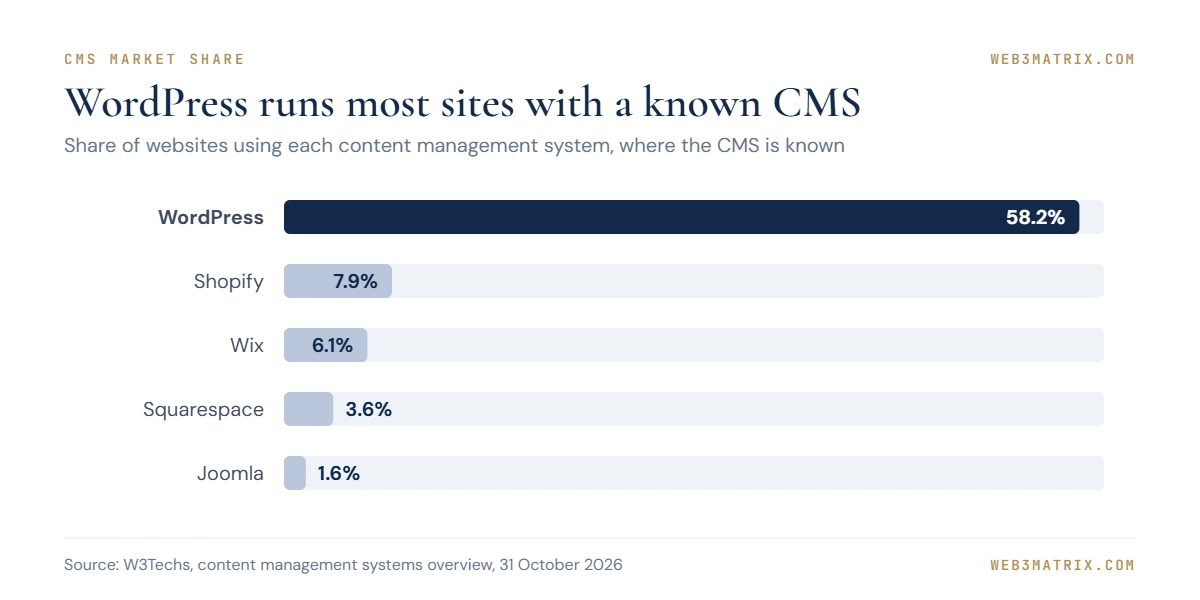
Yes, for most content-led and lead-generating business websites. WordPress powers 39.5% of all websites and holds 58.2% of the market among sites whose content management system is known, according to W3Techs data from 30 October 2026 [1]. That reach matters to a business in practical ways: developers, themes, plugins and hosting built for WordPress are widely available, so you are not tied to one supplier.
The nearest alternatives are far smaller. Among websites with a known content management system, Shopify holds 7.9%, Wix 6.1% and Squarespace 3.6% [10].
The software is also still moving. WordPress 6.9 introduced the Abilities API, which lets plugins, themes and WordPress itself describe what they can do in a format AI tools and automation can use [7].
Popularity alone is not a reason to choose it, though. The better question is whether your business fits the way WordPress works: you own the site, and you are responsible for keeping it updated.
When WordPress is the right choice
WordPress earns its place when a business needs at least two or three of these:
- Regular publishing. Blog posts, guides, case studies or news, organised with categories and multiple authors.
- Ownership. WordPress is open source and licensed under the GNU General Public License (GPLv2 or later) [6], so you can move your site to another host or developer without asking permission.
- Room to grow. Booking systems, memberships, multiple languages or an online store can be added later through plugins rather than a rebuild.
- Control over SEO. Page titles, URLs, redirects and structured data can all be managed on the site.
- Several editors. User roles let staff add content without full admin access.
- A maintenance budget. Updates, backups and security checks are planned, either in-house or with a developer.
“You need your own site that belongs to you… like your own home on the Internet.”
When WordPress is the wrong choice
WordPress is a poor fit in four situations:
- Nobody will maintain it. A WordPress site that is never updated becomes a security risk.
- The site is small and will stay small. A five-page site the owner edits twice a year may not justify running a self-hosted platform.
- The site is mainly a store. A hosted commerce platform may need less technical work.
- The site is really an application. Customer portals, complex calculators or custom workflows are often cleaner as a custom build.
The first point deserves weight. Patchstack recorded 11,334 new vulnerabilities in the WordPress ecosystem in 2025, 42% more than in 2024. Of those, 91% were in plugins and 9% in themes, and 46% had no developer fix available when they were publicly disclosed [2]. Flexibility comes from plugins, and so does most of the risk.
Professional tip: Before you choose WordPress, name the person who will apply updates and check backups every month. If you cannot name anyone, budget for a maintenance plan or choose a hosted platform.
WordPress vs Wix: which is better for a business?
Neither is better in general. Wix is a hosted website builder: hosting, security and software updates are part of the subscription. WordPress, in its self-hosted form, gives you more control and flexibility, but you or your developer handle those jobs.
| WordPress (self-hosted) | Wix | |
|---|---|---|
| Hosting | You choose and pay for it separately | Included in the plan |
| Software updates and security | Your responsibility (or your developer’s) | Handled by Wix |
| Ownership and moving | Open source; move hosts freely [6] | The site runs on Wix’s platform |
| Flexibility | Very high, through themes, plugins and custom code | Limited to Wix’s features and apps |
| Best for | Growing, content-led sites with a maintenance plan | Small sites the owner builds and runs alone |
Wix lists its premium plans at $17.77 (Light), $29.77 (Core), $39.77 (Business) and $159.77 (Business Elite) a month, billed yearly. Wix shows these USD prices for reference only and notes that prices and currency vary by location [3]. In the UK, ExpertSure’s 2026 price guide, checked against Wix’s UK pricing page, lists the same plans at £9, £16, £25 and £119 a month on annual billing [11].
Why do some people say Wix is better than WordPress?
Because for a small business with no technical help, it can be. There is nothing to install, no plugins to update and no hosting to manage, and Wix’s AI builder can create a first version of a site from a description of what you want [8]. The trade-off arrives later: if the business outgrows Wix’s features, moving usually means rebuilding the site elsewhere rather than simply changing host.
WordPress vs Shopify for an online store
If selling online is the main job of the website, compare Shopify with WooCommerce, the store plugin for WordPress.
Shopify’s Basic plan costs $29 a month billed yearly or $39 billed monthly in the US, with online card payments at 2.9% plus 30¢ per transaction [4]. In the UK, the same plan costs £19 a month billed yearly or £25 billed monthly, with a standard online card rate of 2% plus 25p [5]. Hosting, security and checkout are included. Our Shopify development page explains what a Shopify store build involves.
WooCommerce turns a WordPress site into a store and keeps everything on a site you control, which helps when content and products need to sit together. In return, you manage hosting, updates, security and the payment gateway yourself.
| Choose | When |
|---|---|
| Shopify | Products are the business, you want checkout and security handled, and you accept monthly and per-transaction fees |
| WooCommerce on WordPress | Content matters as much as products, you want full control, and you have someone to maintain the site |
Professional tip: Model payment fees at your expected annual sales before comparing platforms. On a busy store, transaction fees can outgrow every other running cost.
What WordPress really costs a business
WordPress itself carries no licence fee: it is open source software released under the GPLv2 or later [6]. A business site still has costs: a domain, hosting, any premium themes or plugins, the build itself and ongoing maintenance. Our website cost breakdown sets out typical ranges for each of these lines in USD and GBP.
From our own site
The redesign of web3matrix.com started life as a static, multi-page HTML demo. When we moved it into WordPress in October 2026, we kept the design by placing many pages inside Elementor as HTML blocks that share one stylesheet, and used Elementor’s own widgets elsewhere. What WordPress added was everything around the design: a blog with categories, an SEO plugin and the ability to write posts in batches and schedule them. A static site would have needed a developer for each new page; on WordPress, adding a post is an editing job.
Find your fit in five questions
Answer five questions to see which type of platform fits your business best. The result is a starting point for a conversation with a developer, not a quote.
Interactive picker
Which platform fits your business?
Answer five questions to see whether WordPress, a website builder, Shopify or a custom build fits best.
A starting point for a conversation with a developer, not a quote. Scores are a simple guide based on the factors in this article.
The decision, step by step
The flowchart below follows the same logic as the questions above, in the order we would work through them with a client.
Text version of this workflow
- Start: list what the site must do — Jobs, pages, who updates it
- Is selling products the main job? — Yes: compare Shopify and WooCommerce; No: go to question 2
- Is it really an application? — Portal, custom logic or workflow; Yes: consider a custom build
- Small site you will run alone? — Under 10 pages, no developer; Yes: a builder such as Wix may fit
- Need growth, content and ownership? — Publishing, SEO, moving freely; Yes: WordPress fits well
- Who will maintain it? — Updates, backups, security; No one: rethink or buy a plan
- Shortlist and test — Ask for a demo or a trial; Compare 3-year running costs
AI is changing both options
AI is making the first version of a website faster on every platform. Wix lets you create a site by describing what you want, then refine it with its built-in AI agent or by editing manually [8]. WordPress is adding the plumbing for AI tools: the Abilities API in WordPress 6.9 gives AI systems and automation a standard way to see and use what a site can do [7].
Neither development removes the underlying decision. AI can draft pages and layouts quickly, but it does not change who owns the site, who maintains it or how easily you can move it later. Use AI to speed up the work, and make the platform choice on those three questions.
I am choosing a platform for my business website. My business: [what you do and where]. The site must: [list the jobs, e.g. take enquiries, publish articles, sell products, take bookings]. Pages now and in two years: [number]. Who will update it: [me / staff / a developer]. Monthly budget for running costs: [amount]. Compare WordPress (self-hosted), Wix and Shopify for my situation. For each, list what I would have to manage myself, the types of running cost to expect, how easy it would be to move away later, and any feature I listed that it would struggle with. Then recommend one and explain why in five sentences. Do not quote prices or statistics unless you can name the source; flag anything you are unsure of.
Works in ChatGPT, Claude, Gemini or Copilot. Treat the answer as a first draft and check every figure and date before you rely on it.
Questions to ask before you commit
- Who will apply updates and check backups, and how often?
- Who owns the domain, hosting and admin accounts?
- Which features do we need now, and which might we need in two years?
- What would it take to move to another platform or developer?
- What are the total running costs over three years, including plugins, apps and transaction fees?
Frequently asked questions
What is better, Wix or WordPress?
Wix is better for a small site the owner builds and runs alone, because hosting, security and updates are included. WordPress is better for a growing business that wants more flexibility and full ownership and can budget for maintenance.
What's better, Shopify or WordPress?
For a business where products are the main focus, Shopify is usually simpler because checkout, hosting and security are handled for you. WordPress with WooCommerce suits stores where content matters as much as products and where someone can maintain the site.
Why is Wix better than WordPress?
Wix is not better in general, but it is easier for a non-technical owner: there is nothing to install or update, and its AI builder can produce a first draft from a description [8]. The trade-off is less flexibility and a harder move if the business outgrows it.
Is WordPress free for business use?
Yes. WordPress is open source software released under the GPLv2 or later [6], and there is no licence fee for using it on a business website. You still pay for a domain, hosting, any premium themes or plugins, the build and maintenance.
Making the call
WordPress remains a strong choice for business websites that need to grow, rank and stay under your control. Choose it when content and ownership matter and maintenance is planned. Choose a website builder when simplicity matters most, Shopify when the store is the business, and a custom build when the website is really an application.
If you want a second opinion on your own requirements, our WordPress development team can talk it through, or we can build a free demo homepage so you can see the result before deciding.
Written by Shaiful Mozumder, Founder, Senior Web Developer and SEO at Web3matrix, building websites for businesses since 2010.
Sources
- W3Techs — Usage statistics and market share of WordPress
- Patchstack — State of WordPress Security in 2026
- Wix — Premium plans
- Shopify — Pricing (US)
- Shopify — Pricing (UK)
- WordPress.org — License
- Make WordPress Core — Abilities API in WordPress 6.9
- Wix — AI Website Builder
- The James Altucher Show — Ep. 220: Matt Mullenweg, Do You Have Your Own Internal “Code”
- W3Techs — Usage statistics of content management systems
- ExpertSure — Wix Pricing UK 2026: All Plans, Fees and Hidden Costs