London: 116 Cavell Street, E1 2JA · Dhaka: Rd #24, H #10, Rupnagar, Mirpur-1216

Website planning · Pillar guide
How to Plan a Business Website: Cost, Timeline, Platform and Process
By Shaiful Mozumder · Published 31 October 2026
In February 2026, WebAIM tested the home pages of the top one million websites and found detectable WCAG 2 accessibility failures on 95.9% of them, an average of 56.1 errors per page [1]. The most common problem was low-contrast text, which turned up on 83.9% of home pages [1].
Low contrast comes from choices made early, when someone picks colours, fonts and a layout. The same is true of most expensive website problems: slow pages, confusing menus, missing pages, forms that leak spam, a platform you outgrow within a year. Most of them are planning decisions that were made badly, or never made at all.
This guide takes you through those decisions in the order they matter: goals, pages, budget, timeline, platform, who builds it, the quality standards to set, and how to write a brief a developer can price accurately. By the end you will be able to plan a business website you can budget for, brief clearly and keep improving after launch.
Key takeaways
- Planning means making six decisions before anyone designs anything: goals, pages, budget, timeline, platform and who builds it.
- Professional small-business websites in the US commonly cost several thousand dollars, and agency builds often run past $10,000. Published surveys vary widely, so get quotes against a written brief rather than trusting averages.
- Ongoing costs (domain, hosting, maintenance, content and security) are part of the real budget, not extras.
- Timelines slip most often because content is late or decisions keep getting reopened, not because of development work.
- WordPress runs about four in ten of all websites, but the right platform depends on what your site has to do, who will edit it and how you plan to grow.
- Speed, accessibility, security and privacy are far cheaper to build in from the start than to add later.
- Google says AI Overviews and AI Mode need no special optimisation beyond normal SEO basics, so clear structure and useful, accurate content matter most.
- A one-to-two-page brief is the single best tool for getting accurate quotes and a website that matches what you expected.
What does planning a business website involve?
Planning a business website means deciding what the site must achieve, what it must contain, what it will cost to build and run, and who will build and maintain it, all before design starts. Each decision limits the next. A site whose main job is taking online bookings needs different pages, a different platform and a different budget from a site that mainly builds trust for a law firm.
Infographic
The website planning roadmap: six decisions, in order
Each decision limits the next. Make them before anyone starts designing.
Goals
What should the website achieve for the business?
OutputOne primary visitor action and 2–3 measurable goals
Pages
What must the site contain to support that action?
OutputA sitemap: the page list and how pages connect
Budget
What can you spend on the build, and every year after?
OutputA build range plus an annual running-cost figure
Timeline
When must it be live, and what has to happen first?
OutputA launch date with content and approval deadlines
Platform
What should the site be built on?
OutputA platform that fits your features and who edits the site
Builder
Who will build it, and who will look after it?
OutputAgency, freelancer or DIY, plus a written brief
The order matters because each stage feeds the next. People who start at stage 5 (“We need a WordPress site”) or stage 3 (“We have $2,000”) often end up rebuilding: the platform or budget was chosen before anyone knew what the site had to do.
Text version of this workflow
- Start: a business need — New website, rebuild or redesign
- Goals and audience — Choose the one visitor action; Set 2–3 measurable goals; Record current results
- Pages and features — Sketch the sitemap; List features and integrations
- Budget — Build budget range; Yearly running costs
- Timeline — Fix a launch date; Set content and approval deadlines
- Platform — WordPress, Shopify, builder or custom; Match features and editing needs
- Who builds it — Agency, freelancer or DIY
- Brief and quotes — One brief to every supplier; Itemised quotes
- Quotes fit budget and scope?
- Build and content — Confirm ownership in writing; Gather content alongside design
- Test and launch — Speed, accessibility, forms; Redirects and tracking
- After launch — Submit sitemap in Search Console; Maintain and improve
Start with goals, audience and the one action you want visitors to take
The most useful planning question is: when the right visitor lands on your site, what is the one thing you want them to do? For most small businesses the answer is one of these: call, book, request a quote, buy, or visit in person. Every other decision should make that action easier.
Write down three things:
- The primary action. For example: “Book a table”, “Request a free quote”, “Add to basket”.
- The audience. Who they are, what they already know, what worries them and which device they are likely to use. A restaurant’s visitors are often on a phone, deciding quickly. A manufacturer’s buyers may be at a desk comparing suppliers over several weeks.
- Two or three measurable goals. For example: “40 quote requests a month”, “half of all bookings made online”, “fewer phone calls asking for opening hours”.
A common mistake: treating the website as a digital brochure with no job. When nobody has decided what the site is for, every page gets equal weight, the main call to action gets lost, and nobody can tell whether the new site performs better than the old one. The fix: pick one primary action and design the homepage, menu and every service page around it.
Measurable goals also give you a baseline. If you have an existing site, record its current enquiries, bookings or sales before you rebuild, so you can judge the new site on results rather than looks.
Which pages does a small business website need?
Most small business websites need a homepage, one page for each main service or product category, an about page, a contact page and the legal pages your location requires. Everything else is optional and should earn its place by supporting your primary action.
| Page | Why it exists | Often forgotten |
|---|---|---|
| Homepage | Explains who you serve and what to do next | A clear primary call to action above the fold |
| Service or product pages | One page per main offer, so each can answer specific questions and rank for its own searches | Prices or price guidance, process, FAQs |
| About | Builds trust: who you are, experience, credentials | Real photos and named people |
| Contact | Removes friction: form, phone, map, hours | Response-time expectations |
| Case studies or portfolio | Proof that you have done this before | Results and context, not just pictures |
| Blog or guides | Answers customer questions and supports search visibility | A publishing plan you can sustain |
| Privacy, cookie and accessibility statements | Legal and trust requirements | Keeping them accurate as the site changes |
A sitemap here means a simple planning diagram of pages and how they link. It is not the XML file search engines read. Sketch it before talking to developers. It is the single biggest driver of cost and timeline, because every page needs content, design and testing.
The trade-off: combining all your services on one page is cheaper and quicker, but that page has to rank for several different searches and answer several different sets of questions at once, and it usually does neither well. Separate service pages cost more to write but give each offer a page built around one customer need. If budget is tight, build separate pages for your two or three most profitable services and group the rest.
From our own rebuild
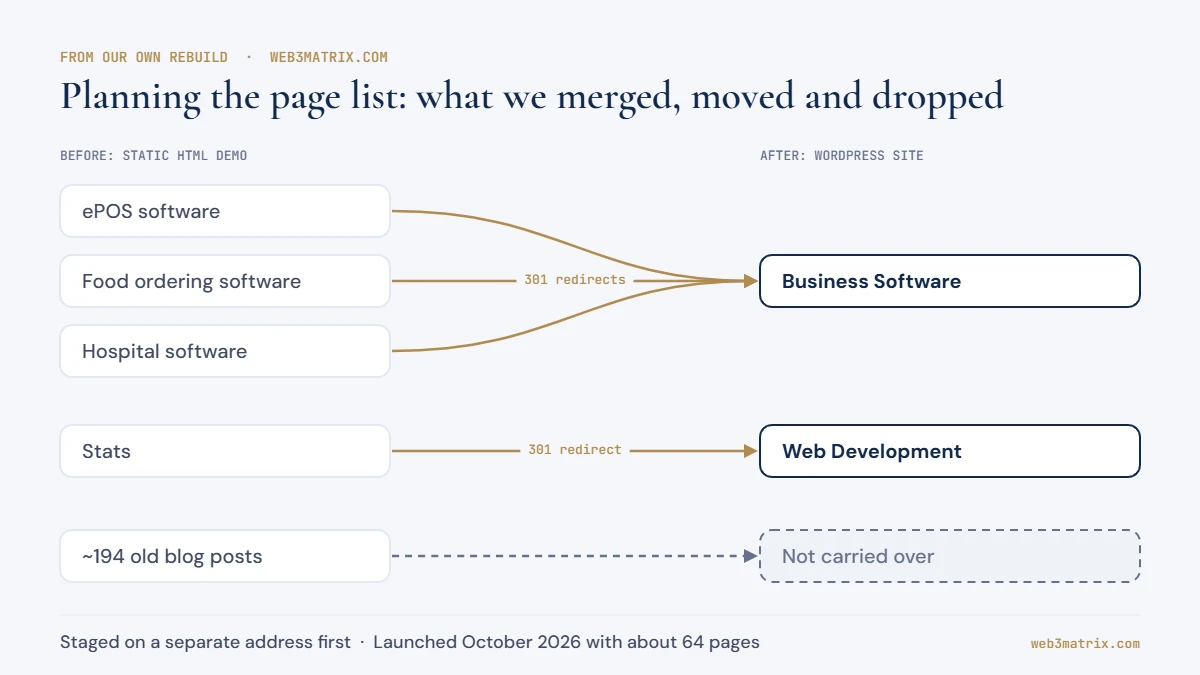
When we moved web3matrix.com from a static HTML demo to WordPress, we staged the new site on a separate address and only switched the live domain over in October 2026. Several pages were thin and overlapped, so we merged our ePOS, food ordering and hospital software pages into one Business Software page and pointed the old URLs at it with 301 redirects. We also chose not to carry over around 194 old blog posts. The site launched with about 64 pages, each of which had to justify its place in the plan.
How much does a business website cost?
A professional small business website can cost anything from a few hundred pounds for a basic build to well over $10,000 for an agency project, and the range is wide because “a website” covers very different projects. Published figures disagree, so treat them as reference points rather than prices.
Two widely cited US sources show the spread:
- WebFX’s 2026 pricing guide, based on a survey of 250 US marketing professionals, puts basic web design for small businesses at about $6,500 to $15,000 on average. It reports professional copywriting at $60 to $300 per page [2].
- Clutch’s 2026 pricing guide, drawn from its agency database and verified client reviews, says most web design projects cost less than $10,000. It also reports an average project cost of $38,105 and typical agency rates of $100 to $149 an hour [3]. That average is pulled up by large projects, which is why it sits so far above the typical figure.
For UK readers, Startups.co.uk’s small business guide, updated in March 2026, puts a basic website from a designer or agency at around £300 to £1,000 and a custom or bespoke build at £10,000 or more. It quotes typical UK rates of £25 to £50 an hour for freelance web designers and £50 to £150 an hour for small agencies [13].
All of these are reference points, not quotes. Prices in Europe and elsewhere differ again, so use them to understand what drives cost rather than as a local price.
What drives the cost of building a website
| Cost driver | Lower-cost version | Higher-cost version |
|---|---|---|
| Number of pages | 5–10 pages from a shared template | Dozens of individually designed pages |
| Design | Customised theme | Fully custom design system |
| Content | You supply finished text and photos | Professional copywriting and photography [2] |
| Functionality | Contact form, map, gallery | Bookings, e-commerce, member areas, integrations |
| Platform | Website builder or WordPress | Custom-built application |
| Migration | New site, nothing to move | Existing content, redirects and SEO to preserve |
| Accessibility and performance targets | Platform defaults | Tested against WCAG 2.2 AA and Core Web Vitals |
The running costs people leave out
The build is the first bill, not the only one. Every website has recurring costs:
- Domain renewal: usually annual. Startups.co.uk puts a UK domain at about £8 to £20 or more a year [13].
- Hosting: monthly or annual, depending on traffic and the type of hosting. Outside a website builder, UK hosting runs from about £20 to £300 or more a year [13].
- Maintenance: software updates, backups, security monitoring and fixes.
- Paid plugins, apps or licences: many renew every year.
- Content: new pages, updated prices, blog posts and photos.
- Marketing: search, advertising or social media, if the site has to bring in new customers rather than serve existing ones.
Ask every quote to separate one-off build costs from annual running costs, so you can compare the total over two or three years rather than just the launch price.
To turn your page list and features into an estimate, use the Web3matrix project cost estimator, then compare it with the quotes you receive.
A common mistake: choosing the cheapest quote without checking what it leaves out. A low price often means you write all the content, there are no revisions, no accessibility testing and no post-launch support. The fix: send every supplier the same brief and ask them to say clearly what is and isn’t included.
How long does it take to build a website?
Timelines depend more on content and decisions than on development. Clutch reports that agency web design projects on its platform typically last around seven months [3]. That figure includes larger and more complex projects, so a simple small business site can be much faster, and an e-commerce or custom project slower.
| Phase | What happens | What usually causes delays |
|---|---|---|
| Discovery and planning | Goals, sitemap, features and brief agreed | Too many decision-makers; goals that change halfway |
| Content preparation | Text, photos, prices, testimonials gathered | Content left until the end. This is the most common delay |
| Design | Homepage and key templates designed and approved | Unlimited revision rounds; feedback without priorities |
| Development | Pages built, features added, integrations connected | New features added mid-project |
| Testing | Devices, browsers, forms, speed, accessibility | Testing squeezed because earlier phases overran |
| Launch | Domain switched, redirects set, tracking checked | Domain or hosting logins nobody can find |
| After launch | Fixes, monitoring, first content updates | No one assigned to own the site |
The decision that protects your launch date: gather content in parallel with design, not after it. A hypothetical example: an accountancy firm approves its designs in week three but its partners take six more weeks to sign off service-page text. The developer finished long ago, and the launch waits on the content.
Set three internal deadlines on the day you sign: content complete, design approved and final sign-off. Name one person who can make final decisions.
WordPress, Shopify, website builder or custom build: how to choose a platform
The right platform depends on what the site must do, who will update it and how much control you need. At the end of October 2026, W3Techs measured WordPress on 39.5% of all websites and 58.2% of sites using a known content management system (CMS). Shopify was on 5.3% of all sites, Wix on 4.2% and Squarespace on 2.4% [4]. Popularity tells you how big the community and the pool of developers are. It does not tell you which platform fits your business.
A content management system is the software that lets you edit pages without writing code. Each option makes a different trade-off between control, convenience and cost:
| Platform type | Best fit | Strengths | Limitations |
|---|---|---|---|
| WordPress (self-hosted) | Service businesses, content-heavy sites, sites that will grow | Huge choice of themes and plugins; you own your files; many developers know it | You or your developer handle updates, security and hosting |
| Shopify | Product-led online stores | Hosted checkout, payments and security handled for you | Monthly fees and app costs; less flexibility outside e-commerce |
| WooCommerce (on WordPress) | Stores that also need a strong content site | Full control; integrates with WordPress content | More maintenance responsibility than hosted platforms |
| Website builders (Wix, Squarespace) | Very small sites, quick launches, owner-managed sites | Simple editing; hosting included | Harder to move away from; limited advanced features |
| Custom build (e.g. Laravel) | Unusual workflows, complex integrations, web applications | Built exactly around your process | Highest build and maintenance cost; tied to developers who know the code |
Questions that settle most platform decisions:
- Will you sell products online? If so, compare Shopify and WooCommerce first.
- Who will edit the site week to week, and how comfortable are they with technology?
- Do you need integrations, such as a booking system, CRM or accounting software?
- How important is it that you can move to another supplier without rebuilding?
- Who will handle updates and security once the site is live?
Professional tip: Before choosing a platform, ask who will update the site day to day and let that person try editing a demo page. A platform your team can actually use is worth more than a longer feature list.
Interactive tool
Which website platform fits your business?
Answer five questions to get a starting point for your platform decision.
The counterintuitive point: the cheapest platform to launch is not always the cheapest to own. A website builder can be the fastest route to a simple site, while a business that will add many pages, a blog and integrations over the next few years may save money by starting on a more flexible platform. If you want help weighing these options for your situation, the Web3matrix web development team works across WordPress, Shopify, WooCommerce and custom builds.
Who should build it: agency, freelancer or do it yourself?
Each route makes a different trade-off between cost, capacity and risk.
| Route | Suits | Watch out for |
|---|---|---|
| DIY with a website builder | Very small budgets; simple sites; owners with time | Your time has a cost; quality and accessibility depend on you |
| Freelancer | Clearly defined projects; smaller budgets | Availability, holiday cover and long-term support from one person |
| Agency | Projects needing design, development, content and SEO together; ongoing support | Higher rates; check who actually does the work |
Whoever you choose, ask:
- Can I see sites you built that are live now, and speak to the owners?
- Who owns the domain, hosting account, design files and content once the project is finished?
- What exactly is included, and what costs extra?
- How do you test for speed, accessibility and security?
- What happens after launch, and what does ongoing support cost?
Insist on ownership. The domain should be registered in your business’s name, and you should hold the login details for your domain, hosting and website. Losing access to a domain registered in a former supplier’s name is one of the most avoidable problems in small business web projects.
Build quality in from the start: speed, accessibility, security and privacy
Speed, accessibility, security and privacy are cheapest when they are written into the brief, because adding them later means redesigning and retesting pages that are already finished.
Speed and Core Web Vitals
Core Web Vitals are Google’s measures of loading speed, responsiveness and visual stability. According to web.dev, a good experience means Largest Contentful Paint (LCP) of 2.5 seconds or less, Interaction to Next Paint (INP) of 200 milliseconds or less, and Cumulative Layout Shift (CLS) of 0.1 or less, measured at the 75th percentile of page loads on mobile and desktop [5].
Put those thresholds in the brief. Decisions that affect them are made at planning stage: heavy page builders, large uncompressed images, autoplay videos and too many plugins or third-party scripts.
Accessibility
Accessibility means people with disabilities, including people who use screen readers or keyboards or who have low vision, can use your website. The current standard is the Web Content Accessibility Guidelines (WCAG) 2.2, a W3C Recommendation since October 2023, updated in December 2024. Its success criteria come in three levels, A, AA and AAA [6]. Level AA is the target most organisations work to.
Who it applies to depends on where you trade:
- United States: the Department of Justice’s guidance (published March 2022) says the ADA’s requirements apply to all the goods, services, privileges or activities offered by businesses open to the public, including those offered online. It points to WCAG as helpful technical guidance, while noting that the department has not set a detailed web standard for businesses [7].
- European Union: the European Accessibility Act, Directive (EU) 2019/882, applies from 28 June 2025 and covers services including e-commerce. Microenterprises that provide services are exempt from its accessibility requirements [8]. National laws implement the details, so check the rules in each country you sell to.
This is general information, not legal advice. If your business sells into these markets, confirm your obligations with a qualified adviser.
The WebAIM findings show where to focus: low-contrast text, missing image alternative text, missing form labels and empty links were the most common failures [1]. Each of those is cheap to prevent at design stage.
“Access by everyone regardless of disability is an essential aspect.”
Security
Plan for these from the start:
- An SSL certificate (HTTPS) on every page.
- Automatic, off-site backups you have tested restoring.
- Strong logins with two-factor authentication for admin accounts.
- A firewall and a plan for software updates.
- Spam protection on every form.
Decide before launch who is responsible for each one.
Privacy and cookies
If your site sets cookies or similar technologies, UK rules changed in 2026. ICO guidance now lists five exceptions to the consent requirement, including cookies that are strictly necessary for the service and cookies used solely to collect statistics that help you improve it. For statistics and appearance cookies you must still explain what they do and give visitors an easy way to object [9]. Online advertising and tracking across other sites still need prior consent [9]. The ICO’s guidance is still marked as a draft, so check the current position when you launch. EU countries apply their own rules, and US state privacy laws have their own requirements.
Plan a consent banner that blocks advertising and other non-exempt cookies until visitors agree, a clear way to opt out of analytics, and a privacy policy that matches what the site does.
Plan for search and AI answers from day one
Search visibility starts with the structure you plan, not with tweaks after launch. Google’s SEO Starter Guide recommends descriptive URLs that people find useful, such as words rather than random strings. It also stresses that helpful, reliable, people-first content matters more than most technical adjustments [10].
For AI-generated answers, Google is direct: there are no additional requirements to appear in AI Overviews or AI Mode, and no special optimisation is needed. A page simply has to be indexed and eligible to show in Search with a snippet [11]. In practice, the planning decisions that help ordinary search also help AI answers:
- One topic per page, with a heading that says what the page answers.
- Short, direct answers at the start of each section, then the detail.
- Clean URLs planned before launch, such as
/services/kitchen-fitting/, so you don’t have to redirect pages later. - Text, not images of text, for anything important.
- Internal links between related pages, so both visitors and search engines can find everything.
- Redirects from every old URL to its new equivalent if you are replacing an existing site.
A sitemap file helps search engines find pages. Google notes that a small site, roughly 500 pages or fewer that are thoroughly linked internally, may not need one [12]. Most platforms create one automatically, and submitting it in Google Search Console is still a sensible launch step.
No technique guarantees a ranking or a mention in an AI answer. Clear structure and pages that answer real questions give your site the best chance.
How to write a website brief your developer can price
A website brief is a short document, usually one or two pages, that tells suppliers what the website must do. It is the difference between quotes you can compare and quotes that each describe a different project.
A good brief includes:
- Business summary: what you do, where, and for whom.
- Goals: the primary visitor action and two or three measurable goals.
- Audience: who visits, on which devices, and what they need to know.
- Sitemap: your planned page list.
- Features: forms, bookings, payments, integrations, languages.
- Content: what you will supply, and what you need written or photographed.
- Platform preference: if you have one, and why.
- Quality standards: Core Web Vitals targets, WCAG 2.2 AA, security and privacy requirements.
- Examples: sites you like and dislike, with a sentence on why.
- Budget range: a range helps suppliers suggest the right approach.
- Deadline: your launch date and any fixed events it must meet.
- After launch: who will maintain the site, and what support you need.
Professional tip: Send the identical brief, page list and feature list to every supplier you ask to quote. Quotes are only comparable when they price the same job.
Act as a web project manager. Using my notes below, draft a one-to-two-page website brief with these headings: business and audience, the one action I want visitors to take, measurable goals, page list, features and integrations, who writes the content, budget range for the build and for yearly running costs, launch date and deadlines, platform preferences, and who approves the work. Before you write it, ask me up to five questions about anything that is missing.

My notes: [paste your notes here]
Works in ChatGPT, Claude, Gemini or Copilot. Treat the answer as a first draft and check every figure and date before you rely on it.
Free template
Website brief template (PDF, 2 pages)
Every section above as a fill-in form, plus an ownership checklist. Print it or fill it in on screen.
A brief that includes a budget range is more useful than one without. Suppliers can propose what is achievable within it, rather than guessing and quoting for a project you can’t afford.
Website planning mistakes and how to fix them
- Designing before deciding what the site is for. This happens because design is the visible, enjoyable part. Fix: agree the primary action and goals before reviewing any designs.
- Leaving content until the end. Writing is easy to postpone. Fix: set a content deadline before design starts and assign each page to a named person.
- Comparing quotes for different projects. Without a brief, each supplier imagines a different website. Fix: send everyone the same written brief and ask for itemised quotes.
- Budgeting only for launch. Running costs aren’t visible on the first invoice. Fix: ask for a two- or three-year cost including hosting, maintenance and licences.
- Losing ownership of the domain or accounts. A supplier registers the domain for convenience and keeps it. Fix: register the domain in the business name and keep all logins yourself.
- Forgetting redirects when replacing a site. Old URLs break, and visitors and search engines hit errors. Fix: make a redirect map of every old URL before launch.
A practical website planning roadmap
Follow these steps in order:
- Write down the primary visitor action and two or three measurable goals.
- Record your current website’s results, if you have one.
- Describe your main audience and the devices they use.
- Sketch the sitemap and decide which pages are essential.
- List required features and integrations.
- Set a build budget range and an annual running-cost budget.
- Choose a launch date and work back to content and approval deadlines.
- Shortlist platforms that fit your features and editing needs.
- Decide between agency, freelancer and DIY.
- Write a one-to-two-page brief and send it to shortlisted suppliers.
- Compare itemised quotes on total cost over two to three years.
- Confirm ownership of the domain, hosting and website accounts in writing.
- Gather content alongside design.
- Test speed, accessibility, forms and redirects before launch.
- Submit your sitemap in Google Search Console and check tracking after launch.
Topics this guide covers in more depth
Each of the planning decisions above has its own detailed guide in this series:
- Website cost breakdown: design, development, hosting and ongoing fees itemised.
- How long it takes to build a website: realistic timelines by project type.
- WordPress vs Shopify vs custom build: a detailed platform comparison.
- How to write a website brief: a template your developer can use.
- Redesign or rebuild: how to decide what your current site needs.
- Signs your website is costing you customers: what to check first.
- Agency, freelancer or DIY: pros, cons and real costs.
- Questions to ask before hiring a web developer.
- Which pages a small business website needs.
- Domain, hosting and email explained for business owners.
- Who owns your website: domain, code and content ownership.
- Website migration checklist: moving sites without losing traffic.
Frequently asked questions
How do I create my own website for my small business?
Start by deciding the one action you want visitors to take, then list the pages you need and the features they require. If the site is simple and you have time, a website builder lets you launch it yourself. If you need bookings, e-commerce or room to grow, a platform such as WordPress or Shopify, set up by an experienced developer, usually saves time and rework.
How much does it cost to have a website built for a small business?
It depends mainly on the number of pages, the features and who writes the content. US pricing surveys show most professional projects cost several thousand dollars, and agency builds often run past $10,000, with wide variation between sources. In the UK, a basic site from a designer can cost a few hundred pounds, while custom builds often pass £10,000. Get itemised quotes against the same brief and include running costs for at least two years.
What are the five golden rules of a website?
There is no official set, but five principles hold for almost every business site. Make the primary action obvious. Load quickly on phones. Be usable by people with disabilities. Answer visitors’ questions in plain language. Keep everything accurate and up to date. Each one can be written into your brief as a measurable requirement.
How long does a small business website take to build?
A simple site can be built in weeks if content and decisions are ready, while larger agency projects often take several months. The most common causes of delay are late content and approvals, not development. Setting content and sign-off deadlines at the start protects your launch date.
Do I need to own my website's domain?
Yes. Register the domain in your business’s name and keep the login details yourself, even if a supplier manages it day to day. If you don’t control the domain, you can’t move your website or email to another provider without the current holder’s cooperation.
Should I redesign my current website or start again?
Redesign when the platform, content and structure are sound and mainly the look and usability need work. Rebuild when the platform is outdated, the site is slow or insecure, or your business now needs features the current setup can’t support. In both cases, plan redirects so existing pages keep their search visibility.
Turning your plan into a website
A well-planned website starts with one clear goal and a written brief, and only then moves to platform, design and build. Get the sequence right, budget for the years after launch and build in speed and accessibility from the first design, and you avoid the most common reasons small business websites get rebuilt early.
If you would like to see what your plan could look like before committing, Web3matrix will design a free demo homepage so you can see it before you pay.
Written by Shaiful Mozumder, Founder, Senior Web Developer and SEO at Web3matrix, building websites for businesses since 2010.
Sources
- WebAIM — The WebAIM Million: The 2026 report on the accessibility of the top 1,000,000 home pages
- WebFX — Web Design Pricing: How Much Does Web Design Cost in 2026?
- Clutch — Web Design Company Pricing Guide 2026
- W3Techs — Usage statistics of content management systems
- web.dev — Web Vitals
- W3C Web Accessibility Initiative — WCAG 2 Overview
- ADA.gov — Guidance on Web Accessibility and the ADA
- EUR-Lex — Directive (EU) 2019/882 on the accessibility requirements for products and services
- ICO — What are the exceptions? (Guidance on the use of storage and access technologies)
- Google Search Central — SEO Starter Guide: The Basics
- Google Search Central — AI Features and Your Website
- Google Search Central — What Is a Sitemap
- Startups.co.uk — How much does a website cost for a small business?
- W3C Web Accessibility Initiative — WAI flyer (Tim Berners-Lee quote)