Website Development, AI & SEO Agency
London: 116 Cavell Street, E1 2JA · Dhaka: Rd #24, H #10, Rupnagar, Mirpur-1216

SEO · Pillar guide
How Websites Get Found: Google, AI Overviews and AI Answers
By Shaiful Mozumder · Published 23 November 2026
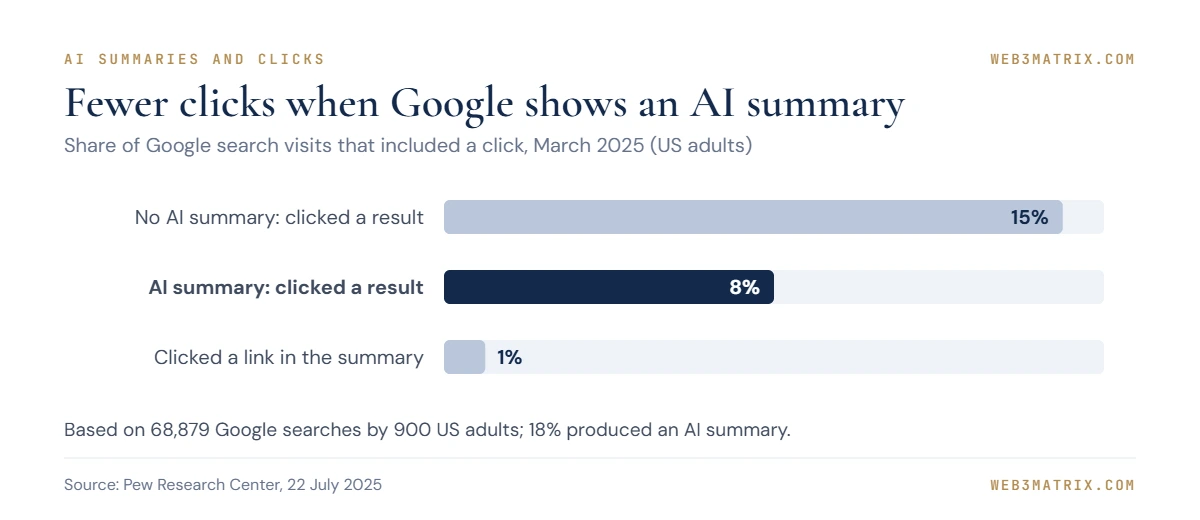
In a Pew Research Center study of real browsing data, Google users who saw an AI summary clicked a traditional search result on 8% of visits. When no summary appeared, they clicked on 15%. Only 1% of visits with a summary included a click on a link inside it [1]. For a business that depends on people finding its website, that is the change in one number: being found now means being shown, cited or chosen, not only ranked.
The mechanics underneath have not changed as much as the headlines suggest. Google still has to crawl and index a page before it can rank it, quote it in an AI Overview or use it in AI Mode, and ChatGPT search still needs to be allowed to read a page before it can cite it. This guide explains how websites get found today across Google Search, Google’s AI features and AI assistants, what you control, what you cannot buy, and the order to work in. If you are still planning the site itself, start with our guide on how to plan a business website.
Key takeaways
- Google finds pages mainly through links and sitemaps, stores them in its index, then chooses which to show; it does not accept payment to crawl or rank a site [2].
- Google says there are no extra requirements to appear in AI Overviews or AI Mode: a page must be indexed and eligible to show with a snippet [3].
- AI Overviews reach more than 2.5 billion monthly users and AI Mode more than one billion, so AI answers are now part of ordinary search [4].
- ChatGPT search depends on OpenAI’s search crawler, OAI-SearchBot; blocking it keeps a site out of ChatGPT search answers [7].
- Local results on Google depend on relevance, distance and prominence, and local ranking cannot be bought [10].
- Structured data helps search engines understand a page but does not guarantee rich results or AI citations [11].
- Most visibility problems trace back to a few fixable causes: pages blocked from indexing, thin or unclear content, and too few trustworthy links and mentions.
How websites get found in 2026: the short answer
A website gets found when a search system can reach its pages, understands what they are about and judges them the most useful answer for a particular search. That is true whether the answer appears as a blue link, a Google Business Profile, a source inside an AI Overview or a citation in ChatGPT.
There are now three overlapping routes to a business website:
| Route | What the searcher sees | What decides whether you appear |
|---|---|---|
| Classic search results | Ranked links with titles and snippets | Crawling, indexing and Google’s ranking systems |
| AI answers inside search | AI Overviews and AI Mode, with cited links | The same index and snippet eligibility, plus how useful your page is for the question |
| AI assistants and other engines | ChatGPT search, Bing and engines using IndexNow, with sources | Whether their crawlers may read your site, and whether your pages answer the question clearly |
The foundation is shared. A page that Google cannot index will not appear in AI Overviews either, and a site that blocks OpenAI’s search crawler will not be cited in ChatGPT search. Most of the work in this guide strengthens all three routes at once.
How Google finds, indexes and ranks your pages
Google works in three stages: crawling, where automated programs download pages; indexing, where Google analyses and stores them; and serving, where it returns the results it judges most relevant to a search [2]. A page has to pass the first two stages before it can compete in the third.
Crawling: how Google discovers pages
Most new pages are discovered through links. Google’s SEO Starter Guide says the vast majority of new pages it finds each day are found through links, and that you usually do not need to do anything except publish your site on the web [5]. A sitemap helps, especially for a new site, but Google describes submitting one as optional [5].
Indexing: whether Google keeps the page
Crawling is not the same as indexing. Google can visit a page and still choose not to store it, for example because it duplicates another page, is blocked by a noindex rule or adds little that is new. If a page is not in the index, it cannot appear anywhere in Google Search, including AI features.
Serving: why one page outranks another
When someone searches, Google chooses from its index the pages it considers most relevant and useful for that search, taking into account things like the searcher’s location and language. Google is explicit that it does not accept payment to crawl a site more often or to rank it higher [2]. Paid search ads exist, but they are labelled as ads and are separate from the organic results.
Timing: after a new page is published, Google says crawling can take anywhere from a few days to a few weeks, and requesting a crawl does not guarantee the page will be included at all [6]. Changes to existing pages can take effect within hours or take several months [5].
Professional tip: Before you worry about rankings, search Google for
site:yourdomain.comand check that your important pages are listed. It is a rough check rather than a full count, but if your homepage or main service pages are missing, fix indexing before anything else.
Google AI Overviews and AI Mode: what changes and what does not
AI Overviews are the AI-generated summaries that appear above some Google results, with links to the pages they draw on. AI Mode is Google’s conversational search, where people ask longer questions and follow-ups. Both now operate at the scale of ordinary search: Google says AI Overviews reach more than 2.5 billion monthly users and that AI Mode passed one billion monthly users in its first year [4].
The rules for appearing in them are simpler than many people expect. Google’s documentation says there are no additional requirements to appear in AI Overviews or AI Mode, and no special optimisation is needed beyond standard SEO. A page must be indexed and eligible to be shown in Google Search with a snippet [3]. Google also says you do not need special schema or new AI text files to appear in these features [3].
“Good SEO is good GEO, or AEO, AIO, LLM SEO, or LMNOPO.”
In plain terms, the work that helps a page rank in Google is the same work that gets it used in Google’s AI answers. What changes is the click. Pew’s analysis of 68,879 searches by 900 US adults in March 2025 found that 18% of searches produced an AI summary, and users clicked a traditional result on 8% of those visits compared with 15% when no summary appeared [1]. Longer searches were far more likely to trigger one: 53% of searches of ten or more words produced a summary, and 60% of searches phrased as questions, compared with 8% of one- or two-word searches [1].
Later studies point the same way. Ahrefs compared 300,000 keywords and estimated that, by December 2025, an AI Overview was linked to a roughly 58% lower click-through rate for the top-ranking page [15]. Seer Interactive’s 2026 update, covering 53 brands and 2.43 billion impressions, found that organic click-through on searches with an AI Overview recovered from 1.3% in December 2025 to 2.4% in February 2026, and that on informational searches, brands cited inside the overview earned about twice the click-through rate of brands that were not [16]. Both studies show correlation rather than cause, but the message for a business is consistent: being the cited source matters more than it used to.
That does not make search less valuable, but it changes what to measure. Fewer, better-informed visitors may arrive, and some people will learn your name in an AI answer and come back later by searching for you directly. Google includes traffic from AI Overviews and AI Mode in the Search Console Performance report, under the Web search type, rather than in a separate report [3].
What you control
You decide whether your content may be used in these features. Google’s controls include nosnippet, data-nosnippet, max-snippet and noindex, and the same rules apply to AI features as to ordinary snippets [3]. Blocking a page with these rules also removes it as a possible source for AI Overviews, so use them only where you have a clear reason. Google-Extended, a separate robots.txt token, is the control Google points to for limiting AI training and grounding in its other systems, outside Search [3].
AI answers outside Google: ChatGPT, Bing and other engines
AI assistants that search the web use their own crawlers, and each one respects different instructions. For a business, the practical question is whether those crawlers are allowed to read your site.
OpenAI runs three separate crawlers, and they do different jobs [7]:
| OpenAI crawler | What it does | What blocking it means |
|---|---|---|
| OAI-SearchBot | Finds pages to show and link to in ChatGPT search | Your site will not be shown in ChatGPT search answers |
| GPTBot | Collects content that may be used to train OpenAI’s models | Your content should not be used for training; search is unaffected |
| ChatGPT-User | Visits a page when a ChatGPT user asks it to | Not used for search; robots.txt rules may not apply because a person started the visit |
Blocking every AI crawler with a single rule also removes your site from ChatGPT search, which may not be what you intended. If you are happy to appear in ChatGPT search but do not want your content used for training, allow OAI-SearchBot and disallow GPTBot. OpenAI also says ChatGPT adds utm_source=chatgpt.com to the links it sends, so you can see these visits in your analytics [8].
Outside Google and OpenAI, IndexNow is a free protocol that lets a website tell participating search engines the moment a page is added, changed or deleted. Participants include Microsoft Bing, Naver, Seznam.cz, Yandex and Yep [9]. Many SEO plugins for WordPress can send IndexNow notifications automatically, which saves waiting for those engines to recrawl.
From our own site
web3matrix.com’s robots.txt keeps crawlers out of the WordPress admin area only, and does not block OAI-SearchBot, GPTBot or Google-Extended. Rank Math generates the sitemap index that robots.txt points to, and every blog post is published with structured data that we validate before it goes live. That gives each search system the same clear route in, and leaves the decision about whether to cite a page to the quality of the page itself.
Professional tip: Open
yourdomain.com/robots.txttoday. If you seeDisallow: /underUser-agent: *, or a list of AI crawlers you never chose to block, ask whoever built the site why. A single line left over from development is enough to keep a finished site out of search.
Local search: how businesses show up on Google Maps
For businesses that serve customers in a particular area, the Google Business Profile often matters as much as the website. Local results on Google are mainly based on three factors: relevance, meaning how well a profile matches the search; distance from the searcher; and prominence, meaning how well-known the business is, which includes reviews and links to its website [10].
Google states plainly that there is no way to request or pay for a better local ranking [10]. What you can do is complete the profile accurately, choose the right categories, keep opening hours current, respond to reviews and make sure the business name, address and contact details match what is on your website. The website and the profile support each other: a clear location page on the site helps Google connect the two.
Local SEO has enough detail to need its own guide, and this site will cover it separately. For now, treat the profile as a second front door to your business and give it the same care as the homepage.
Myths about getting found, and the facts
A lot of advice about search visibility is out of date, sold as a shortcut or simply wrong. These are the claims we hear most often from business owners, set against what the search engines themselves say.
| Myth | Fact |
|---|---|
| “You have to pay Google to be listed.” | Google does not accept payment to crawl a site more often or rank it higher [2]. Ads are a separate, labelled product. |
| “You must submit your site to Google before it can appear.” | Google usually finds sites on its own; submitting a sitemap is optional [5]. |
| “Adding a keywords meta tag helps rankings.” | Google Search does not use the keywords meta tag [5]. |
| “You need special AI files or schema to appear in AI Overviews.” | Google says no special schema or AI text files are needed; standard SEO applies [3]. |
| “Requesting a recrawl again and again gets a page indexed faster.” | Repeat requests for the same URL do not speed up crawling [6]. |
| “Structured data guarantees rich results.” | Structured data helps Google understand a page, but rich results are not guaranteed [11]. |
| “Blocking AI crawlers protects your site and costs nothing.” | Blocking OAI-SearchBot keeps your site out of ChatGPT search answers [7]. Decide crawler by crawler. |
The common thread is that there is no paid or technical shortcut that replaces a crawlable site with useful pages. Most of the real gains come from fixing basic access problems and then making each important page the clearest answer to the questions customers ask.
Content that gets found and cited
Search systems, including AI ones, are trying to give people the most useful answer. Google’s guidance on helpful content asks whether a page is written for people first, demonstrates first-hand expertise and gives a substantial, complete answer rather than one written mainly to attract search visits [13]. Content that meets that standard is also the content most likely to be cited, because it contains something worth quoting.
For a business website, that usually means:
- One clear page per service or topic. A page about “boiler servicing in Leeds” is easier to match to a search than a single page listing every service you offer.
- Answers to the questions customers actually ask. Prices or price ranges, timescales, what is included, who it suits and what happens next. If customers ask it on the phone, it belongs on the page.
- Something only you can say. Your process, real examples, photographs of your own work, and specific details from your experience. AI answers are built from many sources; pages with original information stand out from pages that repeat everyone else.
- Plain, descriptive wording. Headings that say what a section answers, URLs that contain meaningful words [5], and short summaries near the top of long pages.
- Clear signals of who is behind the site. An about page, named authors, contact details and consistent business information help both people and search systems trust the page.
The trade-off: writing pages that properly answer questions takes longer than producing a page for every keyword variation. It is also what Google asks for: its guidance warns against content made mainly to attract search visits rather than to help people [13], so thin pages written to catch searches carry the most risk.
Technical foundations every site needs
Technical SEO is the part of getting found that a visitor never sees: whether search engines can reach, read and understand your pages. For most small business sites the list is short, and the checks below catch the problems we see most often.
| Check | What good looks like | Why it matters |
|---|---|---|
| Indexing allowed | No site-wide noindex; WordPress “Discourage search engines” unticked | One setting can hide the whole site |
| robots.txt | Blocks only private areas; points to your sitemap | Controls which crawlers may read which pages |
| XML sitemap | Lists every page you want found, and nothing you do not | Helps search engines find new and changed pages |
| HTTPS | Every page loads securely, with one preferred version of the domain | Avoids duplicate versions and browser warnings |
| Mobile-friendly and fast | Pages work well on a phone and pass Core Web Vitals | Google mainly uses the mobile version of a page, and many customers search on phones |
| One URL per page | Duplicates redirect or point to a preferred version with a canonical tag | Stops search engines splitting signals across copies |
| Search Console and Bing Webmaster Tools | Both verified, with the sitemap submitted | Shows indexing problems and how people find you |
| Structured data | Accurate business, local business or article markup where relevant | Helps search engines understand the page [11] |
The WordPress setting deserves special mention. Ticking “Discourage search engines from indexing this site” under Settings, Reading adds a noindex instruction to every page [12]. It is meant for sites under construction, and it is easy to forget to untick at launch.
Free checklist
Search visibility checklist (PDF, 2 pages)
Seven sections in the order to work through them: access, registration, technical basics, service pages, local presence, reputation and measurement.
Check your site's search visibility
Use the checklist below to see where your site stands. Tick what is true today; the result updates as you go and lists what to fix first.
Interactive checklist
Search visibility check
Tick what is true for your website today. The result updates as you go.
Your result
Tick the statements above
Each statement is weighted; indexing and clear service pages count the most.
A quick editorial guide based on the checks in this article, not an SEO audit. It cannot predict rankings or AI citations.
Before and after: what we changed when we launched web3matrix.com
When we moved the rebuilt web3matrix.com live on 25 October 2026, the launch checklist was mostly about getting found. This is what changed between the build and the live site.
| Area | During the build | At launch |
|---|---|---|
| Indexing | “Discourage search engines from indexing this site” ticked, so the unfinished site stayed out of search | Setting unticked, and the WordPress and site addresses switched to https://web3matrix.com |
| Thin pages | Separate short pages for ePOS, food ordering and hospital software | Merged into one Business Software page, with 301 redirects from the old addresses |
| Old content | About 194 posts from the old blog | Removed, to make way for a planned pillar-and-cluster blog |
| Crawlers and sitemap | Not relevant while the site was hidden from search | Rank Math sitemap index referenced in robots.txt; AI crawlers not blocked |
A week later, a site:web3matrix.com search on Google still listed our old blog listing page, complete with its 2025 snippet, even though that address now returns a “not found” error. Google updates its index on its own timetable, which is exactly why old addresses that still attract visitors deserve a redirect to their closest new equivalent, and why Search Console’s page indexing report is worth checking in the weeks after any relaunch.
None of these steps is advanced. The order matters most: access first, then content, then reputation.
Measuring whether people can find you
Measure visibility with the free tools search engines provide before paying for anything else. Google Search Console shows which searches your pages appear for, how often they are clicked and which pages have indexing problems; clicks and impressions from AI Overviews and AI Mode are included in the Performance report under Web [3]. Bing Webmaster Tools offers a similar view for Bing.
For AI assistants, look at referral traffic in your analytics. Visits from ChatGPT search carry utm_source=chatgpt.com [8]. These numbers are usually small for a small business, so watch the trend over months rather than reacting to a single week.
Three signals tell you most of what you need:
- Indexed pages: are all the pages you want found actually indexed?
- Impressions for your service and location terms: is the site appearing for the searches that bring customers, not just for your business name?
- Branded searches: are more people searching for your business by name? It is an indirect sign that AI answers, reviews and word of mouth are working.
Professional tip: In Search Console’s Performance report, sort your pages by impressions and look for ones that are shown often but clicked rarely. Rewriting the page title and the opening paragraph so they answer the search more directly is usually the quickest win on an existing site.
How AI is changing search, and what to do about it
The shift in 2026 is from typing keywords to describing a whole problem. Google introduced a redesigned, AI-powered search box at I/O in May 2026, alongside information agents that monitor the web for users in the background [4]. When people ask longer, more specific questions, search systems reward pages that answer specific situations clearly, such as “kitchen fitter who can work around an existing island”, rather than pages that repeat a short keyword.
For a business, the response is practical rather than technical: describe your services, prices, areas and process in plain language, keep your business details consistent across your website and profiles, and earn mentions on sites customers already trust. You can also use an AI assistant to see how it currently describes your business, and if you want help acting on the answer, our AI SEO service can help.
I run a small business. My website is [your web address] and we offer [your main services] in [your town or area]. Search the web and tell me: 1) how you would describe my business in two sentences, 2) which of my web pages you would cite for a customer asking about [a typical customer question], 3) which competitors you would mention for that question and why, and 4) what information about prices, areas served, opening hours or reviews you could not find on my site. List the sources you used and say clearly where you are unsure.
Works in ChatGPT, Claude, Gemini or Copilot. Use an assistant with web search switched on. The answer shows how AI tools currently read your site, not how they rank it; check every claim before acting on it.
Can you do SEO yourself, and what does it cost?
Yes, many business owners handle the basics themselves. Getting into Google’s organic results costs nothing, because Google does not charge to crawl or rank a site [2]. Google’s own SEO Starter Guide is written for site owners doing the work themselves, and suggests hiring a professional if you do not have the time [5].
The jobs that suit doing yourself are the ones in this guide: checking indexing, setting up Search Console, completing your Google Business Profile and writing clear service pages. The jobs where outside help usually pays for itself are technical problems you cannot diagnose, site migrations, competitive local or national markets, and building links and coverage from reputable sites, which is the work our link building service covers.
If you hire help, ask what will be done each month, how results will be reported and what happens to any accounts and content if you stop working together. Be wary of anyone who guarantees a number-one ranking or a place in AI answers: no one outside Google or OpenAI can promise either.
A step-by-step roadmap to getting found
Work through these steps in order. Each one depends on the one before it, so fixing content before access, or chasing links before your pages are worth linking to, wastes effort.
Text version of this workflow
- Start: a live website — New launch or existing site
- Open the doors — Indexing allowed; robots.txt and AI crawlers
- Register with search engines — Search Console, Bing; Submit the sitemap
- Fix the technical basics — HTTPS, one URL per page; Mobile and speed
- One strong page per service — Real questions answered; Prices, timescales, proof
- Set up local presence — Google Business Profile; Consistent details
- Earn trust off the site — Reviews and mentions; Links from reputable sites
- 7. Measure and improve — Search Console monthly; Update low-click pages
- Open the doors. Check that indexing is allowed, robots.txt blocks only private areas and the AI crawlers you want are not blocked.
- Register with the search engines. Verify Google Search Console and Bing Webmaster Tools and submit your sitemap.
- Fix the technical basics. Secure HTTPS, one version of each page, mobile-friendly pages and acceptable speed.
- Build one strong page per service. Answer customers’ real questions, with prices, timescales and evidence of your work.
- Set up your local presence. Complete your Google Business Profile and keep business details consistent everywhere.
- Earn trust off the site. Reviews, directory listings that matter in your industry, and mentions or links from reputable local and trade sites.
- Measure and improve. Review Search Console and analytics monthly, and update pages that are shown often but rarely clicked.
Topics this guide covers in more depth
Each of the topics below will have its own detailed guide as part of this series.
- How Google Search Works: Crawling, Indexing and Ranking in Plain English
- Google AI Overviews and AI Mode: What They Mean for Your Website
- How to Get Your Business Mentioned in ChatGPT, Perplexity and Gemini
- Technical SEO Checklist for Small Business Websites
- Google Search Console: A Beginner’s Guide for Business Owners
- How to Submit Your Sitemap and Get Pages Indexed
- Schema Markup Explained: Does Your Website Need Structured Data?
- Keyword Research for Small Businesses: Finding What Customers Search
- Backlinks Explained: What Good Links Look Like and What to Avoid
- How Long Does SEO Take? Setting Realistic Expectations
- Bing Webmaster Tools and IndexNow: The Overlooked Route to AI Search
- Canonical Tags, Redirects and Duplicate Content Explained
If your site runs on WordPress, our WordPress guide for business owners covers the platform side, including SEO plugins and sitemaps.
Frequently asked questions
How do I make my website discoverable on Google?
Make sure the site is allowed to be indexed, verify it in Google Search Console and submit a sitemap. Then give each service its own clear page and earn links from relevant sites. Google finds most new pages through links, so a site nobody links to is found slowly.
How much does it cost to get my website on Google?
Nothing. Google does not charge to crawl, index or rank a website in its organic results. Costs come from the time spent on the work, any help you hire and any paid ads, which are a separate, labelled product.
How can I get Google to crawl my website faster?
Submit a sitemap in Search Console and use the URL Inspection tool to request indexing for a few important pages. Requesting the same page repeatedly does not speed things up, and crawling can take from a few days to a few weeks.
Can I do SEO for my website myself?
Yes. The basics, including indexing checks, Search Console, a Google Business Profile and clear service pages, are well within reach of most owners. Outside help is most useful for technical problems, site moves and competitive markets.
How do I get AI tools to recognise my business?
Make sure their crawlers can read your site, especially Google’s and OpenAI’s OAI-SearchBot. Then describe your services, location and prices clearly and keep your business details consistent across your site and profiles. You cannot trigger an AI Overview directly; Google decides when to show one.
Why isn't my business showing up in Google searches?
The usual causes are a site blocked from indexing, a new site Google has not yet crawled, pages that do not clearly match what people search for, or an incomplete Google Business Profile. Search Console’s page indexing report shows which pages are excluded and why.
Getting found, step by step
Getting found in 2026 rests on the same foundation it always has: a site search engines can reach, pages that clearly answer what customers ask and a reputation that other sites confirm. AI Overviews, AI Mode and ChatGPT search build on that foundation rather than replacing it, so the work that improves your Google visibility also improves your chances of being cited in AI answers.
Start with access, then content, then reputation, and measure as you go. If you would like a second pair of eyes on why your site is not being found, our SEO services team can audit it, and we can also build a free demo homepage that shows how a search-ready site for your business could look.
Written by Shaiful Mozumder, Founder, Senior Web Developer and SEO at Web3matrix, building websites for businesses since 2010.
Sources
- Pew Research Center — Google users are less likely to click on links when an AI summary appears in the results (22 July 2025)
- Google Search Central — In-depth guide to how Google Search works
- Google Search Central — AI features and your website
- Google — A new era for AI Search (Elizabeth Reid, 19 May 2026)
- Google Search Central — SEO Starter Guide
- Google Search Central — Ask Google to recrawl your URLs
- OpenAI — Overview of OpenAI crawlers
- OpenAI Help Center — Publishers and Developers FAQ
- IndexNow — Instantly index your web content in search engines
- Google Business Profile Help — Tips to improve your local ranking on Google
- Google Search Central — Introduction to structured data markup
- WordPress.org — Settings Reading Screen
- Google Search Central — Creating helpful, reliable, people-first content
- Search Engine Land — Google’s Danny Sullivan: ‘Good SEO is good GEO’ (WordCamp US 2025)
- Ahrefs — Update: AI Overviews Reduce Clicks by 58% (4 February 2026)
- Seer Interactive — AIO Impact on Google CTR: 2026 Update (24 April 2026)
No related posts.