Website Development, AI & SEO Agency
London: 116 Cavell Street, E1 2JA · Dhaka: Rd #24, H #10, Rupnagar, Mirpur-1216

Website planning · Timeline guide
How Long Does It Take to Build a Website? Realistic Timelines by Project Type
By Shaiful Mozumder · Published 13 November 2026
Picture a familiar situation: a business owner signs off a website quote in January, wants the new site live for a spring promotion, and is told “six weeks”. March arrives and the site is still waiting for page copy, two sets of photos and a decision on the booking system. The build itself was never the slow part.
How long it takes to build a website depends less on the developer’s speed than on how ready the business is: content, decisions and feedback. This guide gives realistic timelines by project type, explains where the weeks actually go, and shows how to work back from a launch date. It sits beneath our guide on how to plan a business website, which covers the wider decisions on goals, pages, budget and platform.
Key takeaways
- A brochure site typically takes 2 to 4 weeks, a business site or online store 4 to 8 weeks, and a custom web application 8 to 16 weeks or more.
- The hands-on work is often only a few dozen hours; most of the calendar time is spent waiting for content, feedback and approvals.
- Late content is the most common reason launches slip, so set a content deadline before design starts.
- Domain access, third-party integrations and too many reviewers add weeks that nobody budgets for.
- Launch is not the finish line: search engines can take days to weeks to crawl new pages, and a redesign that changes URLs can take longer to settle.
How long does it take to build a website?
A professionally built brochure website typically takes 2 to 4 weeks, a business site or online store 4 to 8 weeks, and a custom web application 8 to 16 weeks or more. Those are the ranges we publish on our web development page, and they depend mainly on how quickly content and feedback arrive.
Outside benchmarks point the same way. ExpertSure’s UK price guide, updated in October 2026, gives 1 to 7 days for a DIY website builder, 2 to 8 weeks for a freelancer and 4 to 16 weeks for an agency build [6]. Elementor’s 2026 timeline guide puts a small business site built by an agency at 4 to 8 weeks, and a 5 to 15 page site built yourself on a website builder at 1 to 2 weeks [1]. Clutch reports that most web design projects reviewed on its platform last about seven months [2], a figure that reflects the larger, multi-stage projects common in its agency reviews rather than a typical small business site.
AI website builders have shortened the very first step. Wix says its AI builder typically creates a site in a few minutes from a conversation [8]. That gives you a draft, not a finished business website: the content, decisions and checks covered in this guide still take the time.
| Project type | Typical timeline | What sets the pace |
|---|---|---|
| DIY site on a website builder (5 to 15 pages) | 1 to 2 weeks [1] | Your own time and how ready your content is |
| Freelancer-built site (5 to 15 pages, basic features) | 2 to 6 weeks [6] | One person’s availability and your feedback speed |
| Brochure site, professionally built | 2 to 4 weeks | Content, one or two rounds of feedback |
| Business site with more pages or features | 4 to 8 weeks | Number of page templates, forms and integrations |
| Online store | 4 to 8 weeks | Product data, payments, shipping and tax set-up |
| Custom web application | 8 to 16+ weeks | Requirements, user accounts, testing |
| Redesign of an existing site | Similar to a new build, plus migration | Redirects, moving content, search engine re-indexing |
Why the hours and the weeks are different
A small website is not hundreds of hours of work. Our pricing page estimates about 25 hours for a 5-page website, about 55 hours for a 15-page business site, about 75 hours for an online store and about 175 hours for a custom web app. Yet even the smallest of those takes more than a week on the calendar.
The gap is waiting time. Between each stage, someone has to supply text, choose photos, review a design or approve a page. A developer can only build what has been decided.
From our own projects
Our 5-page Starter package is quoted as live in 7 to 10 working days, and that timeline rests on two conditions written into the package: the client supplies the text and photos, and there is one round of revisions. When the content arrives at the start, the build fits inside two working weeks. When the text is still being written, the clock keeps running while the build waits, because nothing can be finished until the words are final.
The stages of a website project
Most professional builds move through the same stages, even when they overlap. Elementor’s guide sets out a typical eight-week agency timeline for a small business site [1]:
| Weeks | Stage | What happens |
|---|---|---|
| 1 to 2 | Strategy, planning and wireframing | Goals, sitemap, page layouts |
| 3 to 4 | Design and revisions | Visual design of key templates |
| 5 to 6 | Development and build | Pages built, features connected |
| 7 | Content population and testing | Text and images added, forms and devices tested |
| 8 | Launch and post-launch checks | Domain switched, redirects and tracking checked |
Professional tip: Get the homepage design approved before the remaining templates are designed. Once one key page is agreed, the other pages have a reference to follow, which keeps later revision rounds shorter.
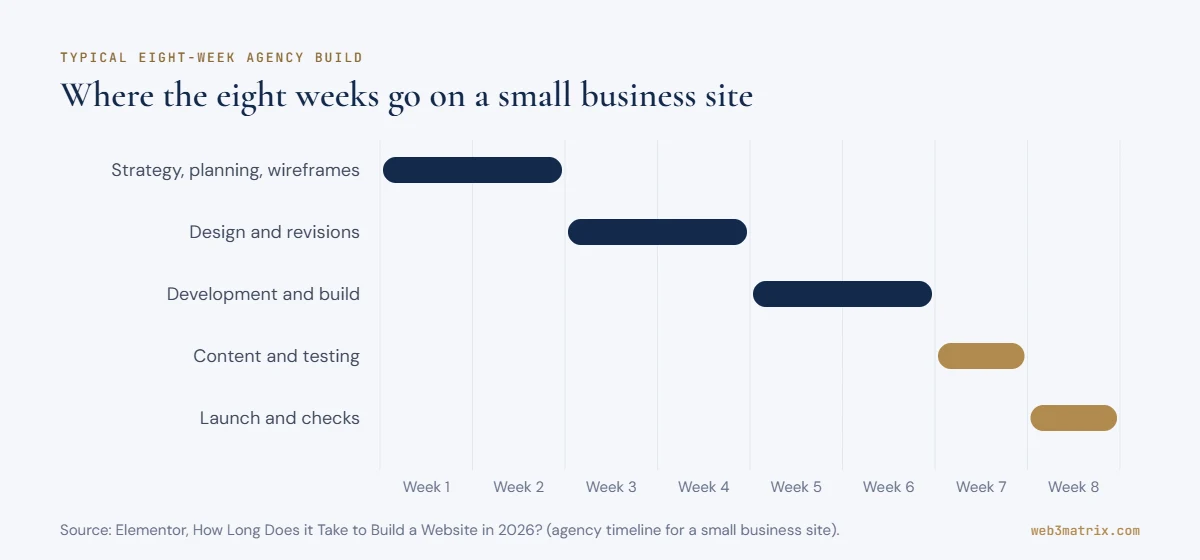
Stages overlap in practice. Content can be written while the design is under review, and that overlap is the single most effective way to shorten a project.
What slows a website project down
Most delays come from the business side of the project, not the build. The table lists the common ones with a fix for each.
| Delay | Why it happens | How to avoid it |
|---|---|---|
| Late content | Writing copy is harder than expected and competes with day-to-day work | Set a content deadline before design starts, or budget for a copywriter |
| Too many reviewers | Each new person adds opinions and another feedback round | Name one decision-maker and agree the number of revision rounds |
| Scope creep | New pages or features are added mid-project | Park new ideas in a phase-two list unless they block launch |
| Domain or hosting access | Logins are held by a former supplier or staff member | Confirm access in week one; check whether the domain can be transferred |
| Third-party integrations | Booking, payment or CRM accounts need approval or set-up | Start account applications early, in parallel with design |
| Legal and policy pages | Privacy, cookie and terms pages are left until last | Prepare them alongside the main content |
Domain transfers deserve a special mention. Under ICANN’s rules, a registrar may refuse to transfer a domain within 60 days of its initial registration or a previous transfer [3]. If moving the domain is part of your plan, check its dates before you fix a launch date.
Professional tip: Collect all feedback in one shared document, with one person consolidating it before it reaches the developer. Otherwise conflicting comments from different people turn into extra revision rounds.
Text version of this workflow
- Kick-off — Logins for domain and hosting; One decision-maker named
- Planning and sitemap — Goals, pages, wireframes
- Design — Homepage first, then templates
- Design approved?
- Build — Pages and features; Content written in parallel
- Content deadline — Final text and images in place
- Testing — Forms, devices, redirects
- Launch — Domain switched; Tracking checked
- First two weeks — Fix what visitors find; Watch indexing
Redesigns and online stores: where the extra time goes
Redesigns and online stores follow the same stages, but each adds work that a new brochure site does not have.
Redesigning an existing website
A redesign carries everything from the old site that is worth keeping: content, search visibility and links from other websites. That means a content audit at the start and a redirect map before launch, so every old URL points to the right new page. After launch, Google notes that a medium-sized site can take a few weeks or more before new URLs gradually replace the old ones in search [5].
From our own rebuild
Before web3matrix.com moved to WordPress, we decided page by page what to keep. Thin pages were merged rather than copied across: the ePOS, food ordering and hospital software pages became one Business Software page, and the stats page was folded into Web Development, each with 301 redirects from the old addresses. We also chose not to carry over around 194 old blog posts. Those decisions took time before the build, and they meant there was less content to rebuild, check and redirect afterwards.
Building an online store
An online store adds product data, payments, shipping and tax rules to the build. Our pricing page estimates about 75 hours of work for an online store against about 55 hours for a 15-page business site, and most of the extra calendar time is spent on things only the business can supply: product photos, descriptions, prices, delivery rates and the details payment providers need before they activate an account.
Start the payment provider application and the product spreadsheet at the beginning of the project. Both can run alongside design, and either one can hold up a store that is otherwise finished.
Work back from your launch date
Use the planner to see roughly when each stage would need to start for a given launch date. It uses the timeline ranges above and the stage split from the eight-week example, so treat it as a planning aid rather than a schedule.
Interactive planner
Launch-date planner
Pick a launch date and project type to see when each stage would need to start.
Your plan (longer end of the range)
Start by –
Stage split follows the eight-week example in this guide (planning 25%, design 25%, build 25%, content and testing 12.5%, launch 12.5%). Ranges are typical, not a quote; your developer's schedule may differ.
If you also want a budget estimate alongside the timeline, our project cost estimator gives both for your page count and features.
I want to launch a [type of website, e.g. 10-page business site] by [launch date]. Work backwards from that date and create a week-by-week plan covering planning and sitemap, content writing, design and revisions, build, testing and launch. Mark every task that depends on me (content, feedback, approvals, logins) with its deadline, and flag any risk to the launch date.
Works in ChatGPT, Claude, Gemini or Copilot. Treat the answer as a first draft and check every figure and date before you rely on it.
Launch is not the finish line
The work in the first weeks after launch is real work, and it belongs in the plan. Search engines need time too: Google says crawling can take anywhere from a few days to a few weeks [4]. If a redesign changes URLs, Google notes that a medium-sized site can take a few weeks or more before the new URLs gradually appear in search, and larger sites longer [5].
From our own rebuild
web3matrix.com went live on WordPress on 25 October 2026. The next day we added a set of security hardening measures, and five days after launch we added spam protection to the contact forms. Six days after going live we were still working through accessibility refinements and form improvements. None of that was a sign the launch had gone wrong; it is what the first weeks of a live website look like, and it is easier when the time is planned in advance.
Professional tip: Keep the first two weeks after launch free of new feature requests. Use them to check forms, redirects, tracking and search indexing, and to fix what real visitors find.
How to speed up a website project without cutting corners
“Adding manpower to a late software project makes it later.”
- Write or commission the main page copy before the design is approved.
- Choose one person who can approve designs and pages.
- Agree the number of revision rounds in the quote.
- Gather logins for the domain, hosting, email and any third-party services in week one.
- Use an existing, well-supported theme or template for a first version, and add custom features in a second phase.
- Book review sessions in advance so feedback does not wait for a free afternoon.
- Plan the launch for a quiet week, not the day before a promotion.
Frequently asked questions
How quickly can I set up a website?
A simple site on a website builder can go live in a day or two if your text and images are ready, and a 5 to 15 page site built yourself typically takes 1 to 2 weeks [1]. A professionally built brochure site usually takes 2 to 4 weeks. The speed depends mostly on how quickly your content and decisions are ready.
Is it hard to make a website for a business?
The tools make a basic website achievable without coding, but a business website needs more than pages: clear content, mobile-friendly design, working forms, privacy pages and search set-up. Many owners build a simple first version themselves and bring in a developer when they need bookings, online sales or a custom design.
How long does it typically take to design a website?
In a typical eight-week agency build for a small business site, design and revisions take about two weeks [1]. A simple site on an existing theme needs less design time; a custom design with several rounds of revisions needs more.
Can a website be built in a week?
Yes, a small site can be built in a week when the content is ready, the design uses an existing theme and there is one round of feedback. A larger site, an online store or a custom design rarely fits in a week, because each stage needs review time.
Why do website projects run late?
Most run late because content, feedback or approvals arrive later than planned, not because the development takes longer. Scope changes mid-project and missing logins for the domain or third-party services are the next most common causes.
Setting a launch date you can keep
A realistic launch date starts from your content and your decision-making, not from the developer’s estimate alone. Pick the project type, add time for content and feedback, protect the first weeks after launch, and check domain access before you commit to a date.
For the cost side of the same decisions, see our website cost breakdown, and for the bigger picture go back to the full website planning guide. If you want to see your new homepage before the project starts, Web3matrix will design a free demo around your business.
Written by Shaiful Mozumder, Founder, Senior Web Developer and SEO at Web3matrix, building websites for businesses since 2010.
Sources
- Elementor — How Long Does it Take to Build a Website in 2026? A Complete Timeline
- Clutch — Web Design Company Pricing Guide 2026
- ICANN — FAQs for Registrants: Transferring Your Domain Name
- Google Search Central — Ask Google to Recrawl Your URLs
- Google Search Central — Site Moves and Migrations
- ExpertSure — How Much Does a Website Cost UK 2026? Full Price Guide
- Wikipedia — The Mythical Man-Month (Fred Brooks, 1975)
- Wix — AI Website Builder